The Longform Guide to Everything Claude Code
Advanced patterns for productive Claude Code sessions: token economics, memory persistence, verification loops, parallelization, and sub-agent orchestration.
title: "The Longform Guide to Everything Claude Code" description: "Advanced patterns for productive Claude Code sessions: token economics, memory persistence, verification loops, parallelization, and sub-agent orchestration." section: "guide" readTime: "20 min" badge: "ECC"
Prerequisite: This guide builds on The Shorthand Guide. Read that first if you haven't set up skills, hooks, subagents, MCPs, and plugins.
In the shorthand guide, the foundational setup was covered: skills and commands, hooks, subagents, MCPs, plugins, and the configuration patterns that form the backbone of an effective Claude Code workflow. That was the setup guide and the base infrastructure.
This longform guide goes into the techniques that separate productive sessions from wasteful ones. If you haven't read the shorthand guide, go back and set up your configs first. What follows assumes you have skills, agents, hooks, and MCPs already configured and working.
The themes here: token economics, memory persistence, verification patterns, parallelization strategies, and the compound effects of building reusable workflows. These are the patterns refined over 10+ months of daily use that make the difference between being plagued by context rot within the first hour, versus maintaining productive sessions for hours.
Tips and Tricks
Some MCPs Are Replaceable and Will Free Up Your Context Window
For MCPs such as version control (GitHub), databases (Supabase), deployment (Vercel, Railway), etc. — most of these platforms already have robust CLIs that the MCP is essentially just wrapping. The MCP is a nice wrapper but it comes at a cost.
To have the CLI function more like an MCP without actually using the MCP (and the decreased context window that comes with it), consider bundling the functionality into skills and commands. Strip out the tools the MCP exposes that make things easy and turn those into commands.
Example: Instead of having the GitHub MCP loaded at all times, create a /gh-pr command that wraps gh pr create with your preferred options. Instead of the Supabase MCP eating context, create skills that use the Supabase CLI directly.
With lazy loading, the context window issue is mostly solved. But token usage and cost is not solved in the same way. The CLI + skills approach is still a token optimization method.
Context and Memory Management
For sharing memory across sessions, a skill or command that summarizes and checks in on progress then saves to a .tmp file in your .claude folder and appends to it until the end of your session is the best bet. The next day it can use that as context and pick up where you left off — create a new file for each session so you don't pollute old context into new work.
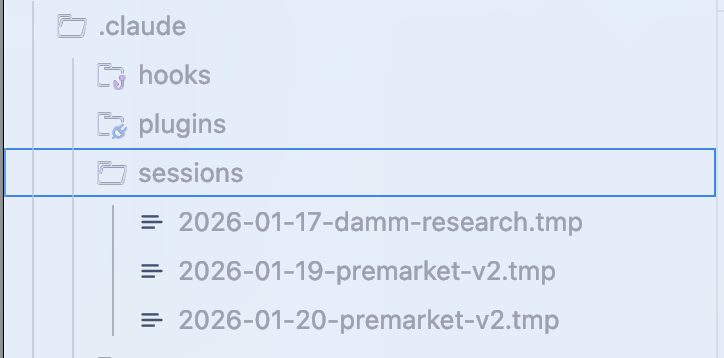
Claude creates a file summarizing current state. Review it, ask for edits if needed, then start fresh. For the new conversation, just provide the file path. Particularly useful when you're hitting context limits and need to continue complex work. These files should contain:
- What approaches worked (verifiably with evidence)
- Which approaches were attempted but did not work
- Which approaches have not been attempted and what's left to do
Clearing Context Strategically
Once you have your plan set and context cleared (default option in plan mode in Claude Code now), you can work from the plan. This is useful when you've accumulated a lot of exploration context that's no longer relevant to execution. For strategic compacting, disable auto compact. Manually compact at logical intervals or create a skill that does so for you.
Advanced: Dynamic System Prompt Injection
One pattern worth adopting: instead of solely putting everything in CLAUDE.md (user scope) or .claude/rules/ (project scope) which loads every session, use CLI flags to inject context dynamically.
claude --system-prompt "$(cat memory.md)"This lets you be more surgical about what context loads when. System prompt content has higher authority than user messages, which have higher authority than tool results.
Practical setup:
# Daily development
alias claude-dev='claude --system-prompt "$(cat ~/.claude/contexts/dev.md)"'

# PR review mode
alias claude-review='claude --system-prompt "$(cat ~/.claude/contexts/review.md)"'

# Research/exploration mode
alias claude-research='claude --system-prompt "$(cat ~/.claude/contexts/research.md)"'Advanced: Memory Persistence Hooks
There are hooks most people don't know about that help with memory:
- PreCompact Hook: Before context compaction happens, save important state to a file
- Stop Hook (Session End): On session end, persist learnings to a file
- SessionStart Hook: On new session, load previous context automatically
These hooks are available in the ECC repo at hooks/memory-persistence/.
Continuous Learning / Memory
If you've had to repeat a prompt multiple times and Claude ran into the same problem or gave you a response you've heard before — those patterns must be appended to skills.
The Problem: Wasted tokens, wasted context, wasted time.
The Solution: When Claude Code discovers something that isn't trivial — a debugging technique, a workaround, some project-specific pattern — it saves that knowledge as a new skill. Next time a similar problem comes up, the skill gets loaded automatically.
Why Stop Hook (Not UserPromptSubmit)
The key design decision is using a Stop hook instead of UserPromptSubmit. UserPromptSubmit runs on every single message — adds latency to every prompt. Stop runs once at session end — lightweight, doesn't slow you down during the session.
Token Optimization
Primary Strategy: Subagent Architecture
Optimize the tools you use and subagent architecture designed to delegate the cheapest possible model that is sufficient for the task.
Model Selection Quick Reference:
| Task Type | Model | Why |
|---|---|---|
| Exploration/search | Haiku | Fast, cheap, good enough for finding files |
| Simple edits | Haiku | Single-file changes, clear instructions |
| Multi-file implementation | Sonnet | Best balance for coding |
| Complex architecture | Opus | Deep reasoning needed |
| PR reviews | Sonnet | Understands context, catches nuance |
| Security analysis | Opus | Can't afford to miss vulnerabilities |
| Writing docs | Haiku | Structure is simple |
| Debugging complex bugs | Opus | Needs to hold entire system in mind |
Default to Sonnet for 90% of coding tasks. Upgrade to Opus when:
- First attempt failed
- Task spans 5+ files
- Architectural decisions needed
- Security-critical code
Token Cost Settings
// ~/.claude/settings.json
{
  "model": "sonnet",
  "env": {
    "MAX_THINKING_TOKENS": "10000",
    "CLAUDE_AUTOCOMPACT_PCT_OVERRIDE": "50",
    "CLAUDE_CODE_SUBAGENT_MODEL": "haiku"
  }
}| Setting | Default | Optimized | Benefit |
|---|---|---|---|
model | opus | sonnet | ~60% cost reduction |
MAX_THINKING_TOKENS | 31,999 | 10,000 | ~70% reduction in thinking cost |
CLAUDE_AUTOCOMPACT_PCT_OVERRIDE | 95 | 50 | Compacts earlier — better quality in long sessions |
Tool-Specific Optimizations
Replace grep with mgrep — ~50% token reduction on average compared to traditional grep or ripgrep. In a 50-task benchmark, mgrep + Claude Code used ~2× fewer tokens than grep-based workflows at similar or better quality.
Modular Codebase Benefits:
Having a more modular codebase with main files in the hundreds of lines instead of thousands of lines helps both in token optimization costs and getting a task done right on the first try.
Verification Loops and Evals
Benchmarking Workflow
Compare asking for the same thing with and without a skill and checking the output difference:
Fork the conversation, initiate a new worktree in one of them without the skill, pull up a diff at the end, see what was logged.
Eval Pattern Types
- Checkpoint-Based Evals: Set explicit checkpoints, verify against defined criteria, fix before proceeding
- Continuous Evals: Run every N minutes or after major changes, full test suite + lint
Key Metrics
pass@k: At least ONE of k attempts succeeds
        k=1: 70%   k=3: 91%   k=5: 97%

pass^k: ALL k attempts must succeed
        k=1: 70%   k=3: 34%   k=5: 17%
Use pass@k when you just need it to work. Use pass^k when consistency is essential.
Orchestrator with Sequential Phases:
Phase 1: RESEARCH (use Explore agent)  → research-summary.md
Phase 2: PLAN (use planner agent)      → plan.md
Phase 3: IMPLEMENT (use tdd-guide)     → code changes
Phase 4: REVIEW (use code-reviewer)    → review-comments.md
Phase 5: VERIFY (use build-resolver) → done or loop backParallelization
When forking conversations in a multi-Claude terminal setup, make sure the scope is well-defined for the actions in the fork and the original conversation. Aim for minimal overlap when it comes to code changes.
Preferred Pattern:
Main chat for code changes, forks for questions about the codebase and its current state, or research on external services.
On Arbitrary Terminal Counts
Avoid setting arbitrary terminal amounts. The addition of a terminal should be out of true necessity.
Your goal should be: how much can you get done with the minimum viable amount of parallelization.
Git Worktrees for Parallel Instances
# Create worktrees for parallel work
git worktree add ../project-feature-a feature-a
git worktree add ../project-feature-b feature-b
git worktree add ../project-refactor  refactor-branch

# Each worktree gets its own Claude instance
cd ../project-feature-a && claudeIf you are scaling instances AND have multiple Claudes working on overlapping code, it's imperative you use git worktrees and have a very well-defined plan for each. Use /rename <name> to name all your chats.
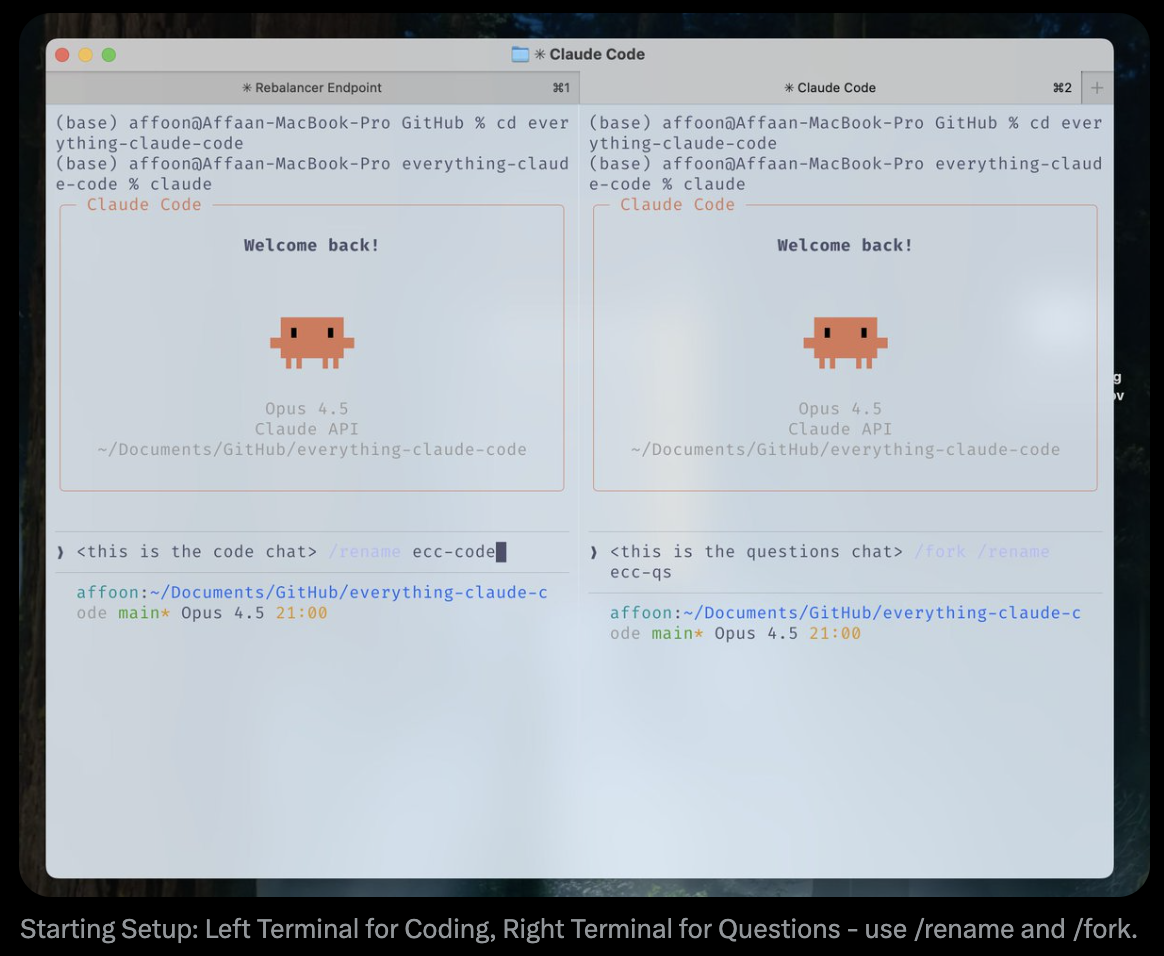
The Cascade Method
When running multiple Claude Code instances, organize with a "cascade" pattern:
- Open new tasks in new tabs to the right
- Sweep left to right, oldest to newest
- Focus on at most 3–4 tasks at a time
Groundwork
The Two-Instance Kickoff Pattern
For workflow management, start an empty repo with 2 open Claude instances.
Instance 1: Scaffolding Agent
- Lays down the scaffold and groundwork
- Creates project structure
- Sets up configs (CLAUDE.md, rules, agents)
Instance 2: Deep Research Agent
- Connects to all your services, web search
- Creates the detailed PRD
- Creates architecture mermaid diagrams
- Compiles the references with actual documentation clips
llms.txt Pattern
If available, you can find an llms.txt on many documentation references by doing /llms.txt on them once you reach their docs page. This gives you a clean, LLM-optimized version of the documentation.
Philosophy: Build Reusable Patterns
"Early on, I spent time building reusable workflows/patterns. Tedious to build, but this had a wild compounding effect as models and agent harnesses improved." — @omarsar0
What to invest in:
- Subagents
- Skills
- Commands
- Planning patterns
- MCP tools
- Context engineering patterns
Best Practices for Agents & Sub-Agents
The Sub-Agent Context Problem
Sub-agents exist to save context by returning summaries instead of dumping everything. But the orchestrator has semantic context the sub-agent lacks. The sub-agent only knows the literal query, not the PURPOSE behind the request.
Iterative Retrieval Pattern
- Orchestrator evaluates every sub-agent return
- Ask follow-up questions before accepting it
- Sub-agent goes back to source, gets answers, returns
- Loop until sufficient (max 3 cycles)
Key: Pass objective context, not just the query.
Key Rules for Sequential Phase Orchestration
- Each agent gets ONE clear input and produces ONE clear output
- Outputs become inputs for next phase
- Never skip phases
- Use
/clearbetween agents - Store intermediate outputs in files
Fun Stuff
Custom Status Line
Set it using /statusline — Claude will say you don't have one but can set it up for you and ask what you want in it.
See also: ccstatusline (community project for custom Claude Code status lines).
Voice Transcription
Talk to Claude Code with your voice. Faster than typing for many people.
- superwhisper, MacWhisper on Mac
- Even with transcription mistakes, Claude understands intent
Terminal Aliases
alias c='claude'
alias gb='github'
alias co='code'
alias q='cd ~/Desktop/projects'Resources
Agent Orchestration:
claude-flow— Community-built enterprise orchestration platform with 54+ specialized agents
Self-Improving Memory:
skills/continuous-learning/— In the ECC repo- rlancemartin.github.io — Session reflection pattern
Official:
References
- Anthropic: Demystifying evals for AI agents
- YK: 32 Claude Code Tips
- RLanceMartin: Session Reflection Pattern
- @PerceptualPeak: Sub-Agent Context Negotiation
- @menhguin: Agent Abstractions Tierlist
- @omarsar0: Compound Effects Philosophy
- The Shorthand Guide — Foundation setup
Everything covered in both guides is available on GitHub at everything-claude-code